


Google needs no introduction in the online community as it is one of the most used and an essential services on the web. But most people do not know how many tools Google has in their wallet. From simple search to most sophisticated analyzing tools and a mobile operating system are there. Here is a brief review of the tools available from Google to improve our web experience better. The link to the service and apps link to the play store is also included to help our users to find the right service easily.
Google search
(https://www.google.com) (Google Search Play Store App)
This is the first and most used tool on the internet. You can search and find virtually anything on the web with Google. You can talk to it instead of type to get what you want and ask follow-up questions too.
Google Maps
(https://www.google.com/maps) (Play Store App)
Use maps for GPS navigation, traffic, and transport and discovers places around you. By monitoring real-time traffic information, Google Maps can help you find the best route to your destination. Take a look around your destination before you get there with Street View and Indoor Maps. Discover where you’ve always wanted to go. Save your home and work addresses in Google Maps and they will auto-populate for faster searching.
Google Translate
(https://translate.google.com) (Play Store App)
Google language translating program helps you to translate to a number of languages. You can speak, scan, type or draw to translate into over 100 languages.
Google Chrome
(https://www.google.com/chrome/) (Chrome app in Play Store)
It is a fast, simple and secure browser for all your devices. Chrome can suggest searches and help you complete web addresses.Google save your passwords and payment information securely with Chrome. Chrome can automatically fill out forms, across all your devices.
Youtube
(https://www.youtube.com/) (Youtube in Play store)
Youtube is a video sharing website. Discover, watch and share your favorite videos and music.
Google Play Music
(https://play.google.com/music/) (Play Music app in Play store)
Subscribe to access millions of songs, on demand and ad-free. Add up to 50,000 songs from your computer and stream them anywhere for free.
Android
(https://www.android.com/)
All kinds of devices for all kinds of folks. With over 2 million apps to choose from, you can make your Android device a one of a kind.
Google Messaging Tools
Gmail
(https://gmail.com) (Gmail App in Play store)
It is a free email service from Google. Gmail is easy to use an email program that saves you time and keeps your messages safe. Get your messages instantly, read and respond to emails, and find any message quickly using the inbox search feature. Gmail offers an organized inbox, which means, the social and promotional messages are sorted into categories so you can read messages from friends and family first. Another feature is less spam, Gmail blocks spam before it hits your inbox to keep your account safe and clutter free. Gmail offers 15GB of free storage, so you won’t need to delete messages to save space.

Google Allo
A smart messaging app that helps you say more and do more.
Google Duo
A simple video calling app that lets you be together at the moment.
Google+
Discover more of what you love and the people who love it, too.
Google Photos
All your photos, organized and easy to find.
Google Contacts
Your family and friends’ addresses and numbers, together at last.
Google Calendar
Organise your schedule and share events with those in your life.
Google Keep
Save your thoughts as notes, lists and voice memos from anywhere.
Google Docs
All your documents, editable and shareable, wherever you are. Google Docs brings your documents to life with smart editing and styling tools to help you easily format text and paragraphs. Choose from hundreds of fonts, add links, images, and drawings. All for free.
Google Sheets
Make your data count with spreadsheets that you can edit anywhere. Google Sheets makes your data pop with colorful charts and graphs. Built-in formulas, pivot tables and conditional formatting options save time and simplify common spreadsheet tasks.
Google Slides
Tell stories with presentations that you can create and take anywhere.
Google Drive
A safe place for all of your files. Drive starts you with 15 GB of free Google online storage, so you can keep photos, stories, designs, drawings, recordings, videos – anything.
Advertising & Business Products
Google AdWords
(https://adwords.google.com) (In Play store)
Advertise to people the moment they search for what you offer. Whether you’re looking to bring in new website visitors, grow online sales, get the phones ringing or keep customers coming back for more, Google AdWords can help. Target your ads to customers in certain countries, regions or cities or within a set distance from your business or shop.
Google AdSense
(https://www.google.com/adsense) (Adsense in Play Store)
Monetize your content with ads you can count on. Ads are reviewed to ensure they’re high quality and relevant to your content or audience, even when viewed on smartphones and tablets. Block ads you don’t like, customize where ads appear, and choose which types fit your site best.
Google Analytics
(https://www.google.com/analytics/) (Analytics app in Play store)
Gain customer insights across your channels. Discover the most engaging customer experiences with Google Optimize. Test different variations of your website and then tailor it to deliver a personalized experience that works best for each customer and for your business.

Google My Business
Use this to get your business info to appear on Google Search and Maps. Your listing appears right when people are searching for your business or businesses like yours on Google Search or Maps. Google My Business makes it easy to create and update your listing. You can create a website with Google My Business. Your website auto-generates with info from your Google listing, plus you can customize it with text, photos, and design themes. Make it count every time someone finds you on Search and Maps. It’s easy to keep your business listing fresh with new posts and photos, custom open-hours, and a free website. Use insights to check out customer views and actions to learn how you’re doing. Insights let you review clicks, calls, listing views, and more.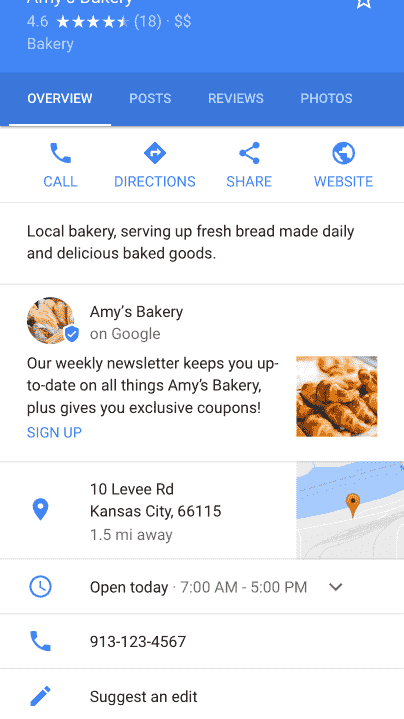
How many apps and services you are using? Which one is your favorite service?

