
Founded in 2006, eFriend is a premium technology website and one of the most popular tech platforms worldwide. The site attracts over 40,000 page views each month and has a strong base of RSS and email subscribers.
Topics Covered in eFriend
Put your business or product in front of a global audience. Promote your brand to a tech-savvy audience. We provide affordable and effective advertising solutions designed to maximize visibility through strategic banner and text placements across our website. We offer flexible and cost-effective advertising opportunities across our website, including banner and text placements in high-visibility locations.
Advertisers can feature their brand on our homepage, category pages, or individual articles, with dedicated sponsor placements available in the right column of the homepage. All advertising is subject to our editorial and advertising guidelines. If you require a custom ad size or placement, feel free to contact us to discuss options and pricing.
How to Advertise on eFriend
Available slots:
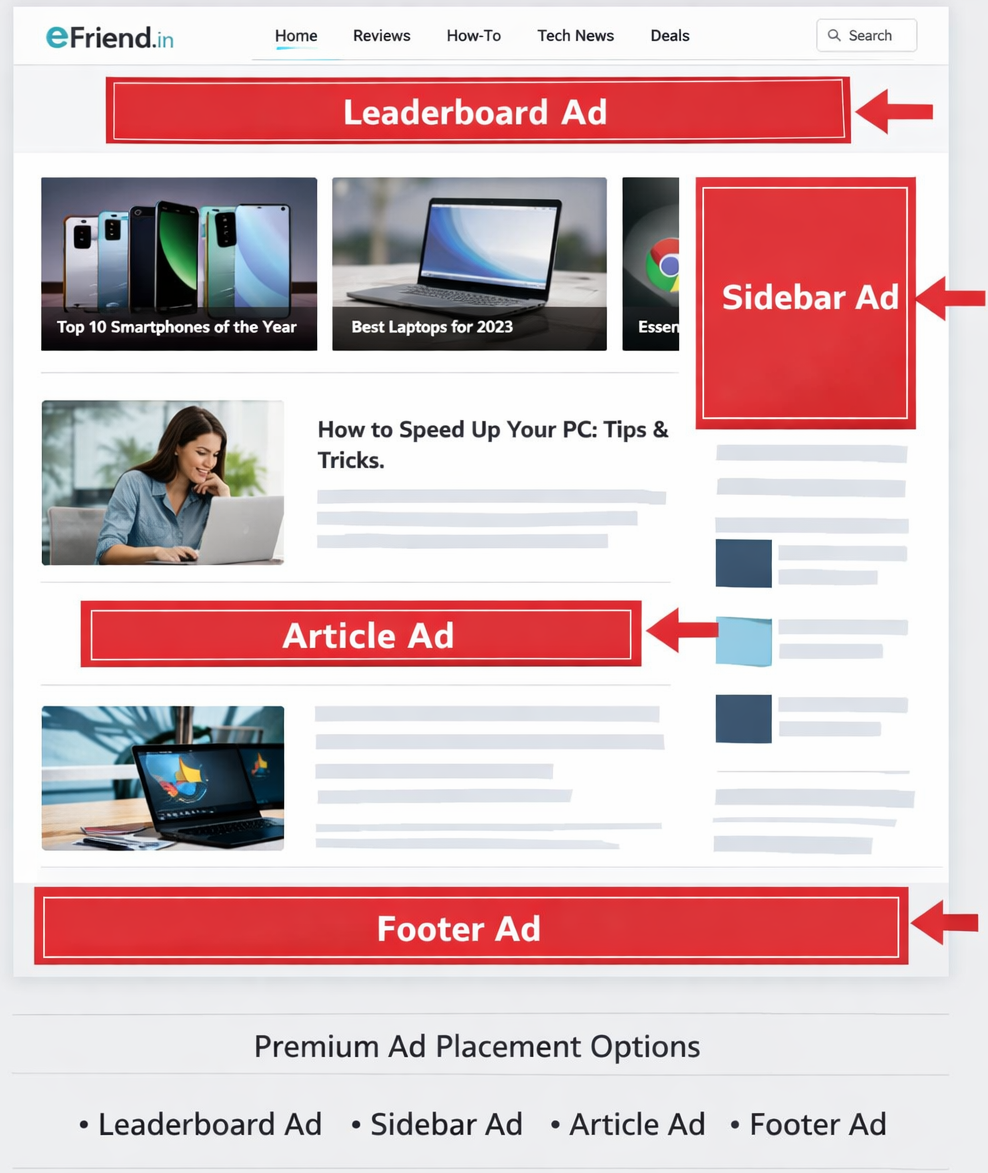
The following banner formats are supported in our site (all banners are above the fold).
On Top
- 728×90 – Leaderboard-Top Banner
Content Area
- 336×280 – Large Rectangle
- 728×90 – Leaderboard
In Sidebar
- 300×250 – Medium Rectangle
- 336×280 – Large Rectangle
- 120×600 – Skyscraper
- 160×600 – Wide Skyscraper
Available slots – RSS feed:
- 468×60 – Image Banner
- Text Ads – (190 characters)
Ad Requirements & Guidelines:
- Ads may not contain nudity or content that is not family safe.
- Ads in the RSS feed will be inserted after every article.
- We do not accept text links anywhere on our site.
- Ad placement locations shown in the picture are only approximate. Actual placement location can change due to editorial content length.
How to contact?
All advertisements on Efriend.in are managed through our dedicated advertising portal, Adlflox.com.
Adlflox makes it easy for advertisers to create, manage, and track campaigns with transparency, flexibility, and full control.
How to Advertise Through Adlflox
Advertising with us is simple and hassle-free. Follow these steps to get started:
- Visit Adlflox.com
Go to Adlflox.com and create an advertiser account using your email address. - Create Your Campaign
Once logged in, choose your preferred ad type—banner ads, sidebar ads, article placements, or homepage sponsorships. - Select Placement & Duration
Pick where you want your ad to appear (homepage, category pages, or article pages) and set your campaign duration. - Upload Your Ad Creative
Upload your banner or text ad as per the recommended sizes and guidelines. - Review Pricing & Submit
Review the pricing, submit your campaign for approval, and complete payment securely. - Go Live & Track Performance
After approval, your ad goes live. You can monitor impressions, clicks, and performance directly from your Adlflox dashboard.